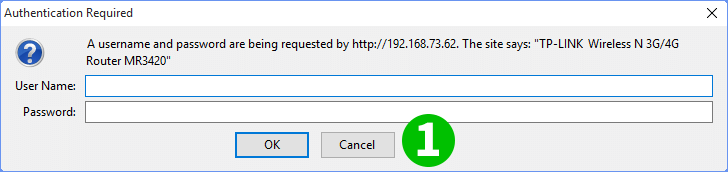
1 Login to the router using your username and password (refer to the bottom side of hardware for default user, password, and router IP address)
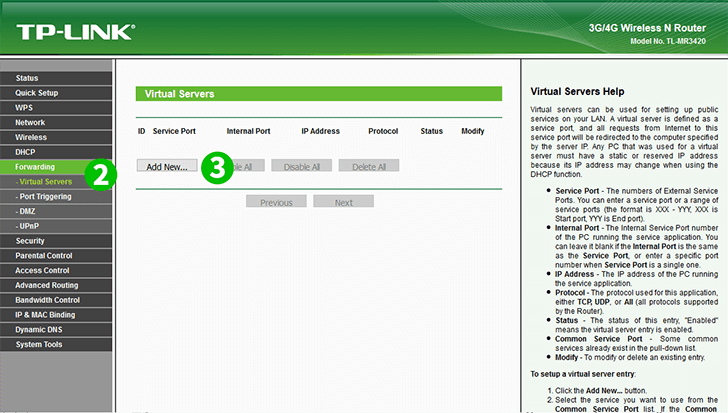
2 Click "Forwarding" menu to open more sub-menus, then click "Virtual Servers"
3 Click "Add New" to add more forwarding data
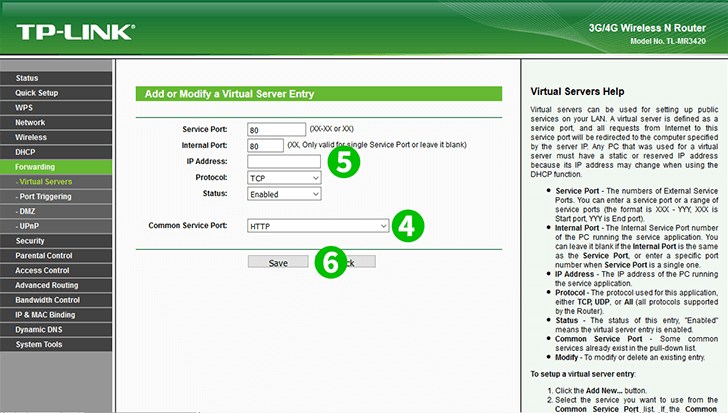
4 Choose "HTTP" from "Common Service Port" and some fields will automatically be filled
5 Fill the "IP Address" field with IP Address of the computer cFos Personal Net is running on
6 Click on "Save" and then on "Done"
برچسبها: انتقال تصویر در مودم
تاريخ : شنبه پنجم مهر ۱۳۹۹ | 10:0 | نویسنده : منتظر المهدی(عج) |